tcpMDT
Move Points - MDT26
Move Points
 | Command to execute in the CAD |
|---|---|
Vertical menu | MDT26 > Points > Edit Points > Move Points |
Ribbon menu | Points > Edit > Transfer |
Command line |
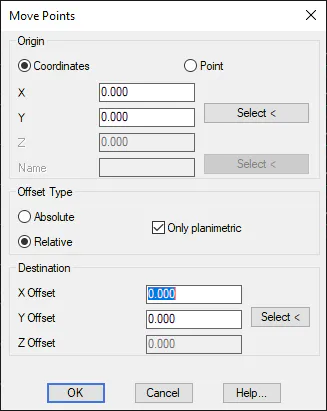
This command enables one to move a scatter plot or a specific selection of its points to a specific position. In order to do so, the base point's coordinates are entered after the points are selected. This can be done manually, selecting them graphically or specifying a specific scatter plot point by indicating its number or marking it in the drawing.
The movement is indicated in either Absolute or Relative terms by activating one or other option and graphically selecting the new base point's coordinates or its relative movement. To prevent modification of the point elevations, check the option Only planimetric.