
tcpMDT
Rotate Points - MDT26
Rotate Points
 | Command to execute in the CAD |
|---|---|
Vertical menu | MDT26 > Points > Edit Points > Rotate Points |
Ribbon menu | Points > Edit > Rotate |
Command line |
If this command is selected, the orientation of the coordinates system of the selected points' coordinate system can be changed.
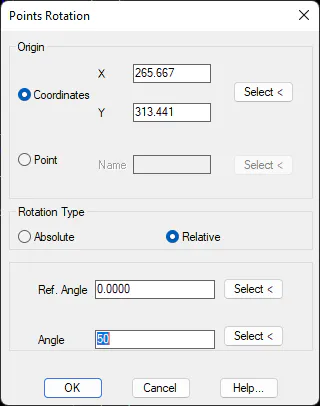
After invoking the command, one is requested the origin or number of the Point from which one wishes to rotate. The former case, one selects a point (by entering its coordinates, numerically, graphically or by selecting a point in the job) and by entering the point's Name in the latter case.
The rotation Angle is then entered, which can be done either graphically or numerically, and the scatter plot is redrawn and centered on screen.