
tcpMDT
Axle Swapping - MDT26
Axle Swapping
 | Command to execute in the CAD |
|---|---|
Vertical menu | MDT26 > Points > Edit Points > Axle Swapping |
Ribbon menu | |
Command line |
This command enables us to change the coordinates of the points or polylines selected. This is particularly useful for altering projects it is normally not possible to execute using MDT, for example, very steep slopes, tunnels, etc.
There are two ways of executing the command: selecting the polylines or a points file.
Selecting Polylines: The default option, whereby executing the command enables us to draw a graph of all the polylines whose coordinates we are going to change. Once concluded the following window appears in which the changes to be executed are inserted:
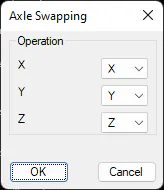
In this case, for example, the X column becomes the Y column, Y becomes X multiplied by (-1) and the Z coordinate remains the same.
The polylines selected will be redrawn on validating the window.
Selecting a file: In this case the change applies to a points file. The following window will appear on selecting this option:
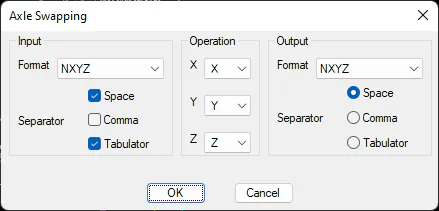
Input: We specify the format of the file used to change the coordinates.
Operation: as in the previous case, we specify the correspondence between the current coordinate and the coordenate to be inserted.
Output: Format of the output file.
On validating this window the command will first ask for the points file in which we are going to change the axes, and then a new file to store the new coordinates once the changes have been made.