tcpMDT
Points Groups - MDT26
Points Groups
 | Command to execute in the CAD |
|---|---|
Vertical menu | MDT26 > Points > Utilities > Points Groups |
Ribbon menu | Points > Operations > Groups |
Command line |
This command allows one to create point groups, making if faster to select such points for different sessions within the same drawing. A point may belong to several groups.
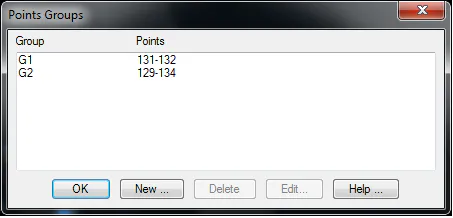
Should this window be opened once a specific selection has been made, it is displayed in the list of groups as Last Selection. It is therefore possible to undo the last operation and perform another operation on the same set of points.
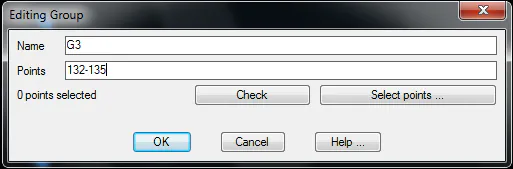
In this window the New button is used to create new groups, with the Editing Group dialog box.
The Edit button displays an Edit Points window containing the data of the group selected, thereby allowing one to modify it. One can also delete groups using the Delete button.
Edit Point Group
A group is defined, and a name assigned to it in this window by entering the point numbers separated by commas and point intervals indicating ends by a dash. The Check button checks the specified syntax and shows the points found. The Select Points button allows one to access the normal point selection options and displays the Point Selection window.