
tcpMDT
Change Scale - MDT26
Change Scale
 | Command to execute in the CAD |
|---|---|
Vertical menu | MDT26 > Points > Change Scale |
Ribbon menu | Points > Edit > Change Scale |
Command line |
As is known, objects are drawn in their real dimensions in CAD, that is to say at a scale of 1:1. However, text sizes must correspond with the scale in which the planes are going to be traced.
This command allows one to modify attribute sizes: number, elevation, code, so that they are represented according to the characteristics of the drawing. A specific text height can be entered directly or, if the program's scale is modified, it is calculated automatically.
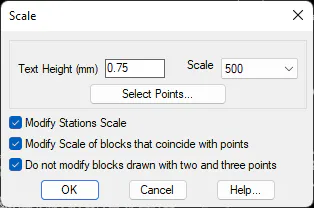
The Modify Stations Scale box also changes the drawing's stations. You can also change scale of blocks whose insertion point matches the coordinates of the point to be scaled. Finally, it is normal not to modify the scale of blocks drawn from two and three points, since it is the distance between the points that determines the scale of the block.