tcpMDT
Change Level - MDT26
Change Level
 | Command to execute in the CAD |
|---|---|
Vertical menu | MDT26 > Points > Edit Points > Change Level |
Ribbon menu | Points > Edit > Change Levels |
Command line |
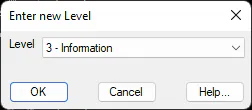
Simultaneously changes the level of a point selection. Firstly, the program requests one to select a set of points. The level to which one wishes to change is then selected.