
tcpMDT
Renumber Points - MDT26
Renumber Points
 | Command to execute in the CAD |
|---|---|
Vertical menu | MDT26 > Points > Edit Points > Renumber Points |
Ribbon menu | Points > Edit > Renumber |
Command line |
This command allows one to modify totally or partially the numeric order of the points represented in the drawing.
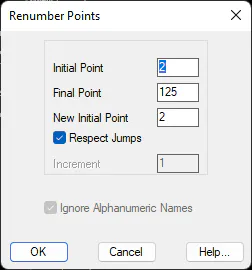
The program displays a dialog box containing the following elements:
Initial Point: Name of the first point one wishes to renumber. This point should be defined, otherwise the program will issue the warning "ERROR: Initial point not found".
Final Point: Name of the final point up o which one wishes to perform the increment.
New Initial Point: Point number one wishes the first point requested will acquire. It should be equal to or greater than 1.
Respect Jumps: Allows one to indicate whether the numbering should be done respecting any possible jumps or increments of more than one point among various or if, on the contrary, all the points from the initial point should be numbered sequentially.
Increment: When the respect jumps option is deactivated, an increment can be entered that will be successively applied to each point. The points therefore can be renumbered, for instance, ten at a time.
Ignore Alphanumeric Names This possibility is enabled when there are point having a name that is not numerical. By activating it, those points will not be modified.
Along with Import Points and Export Points, this command is very useful to combine various jobs into a single job.