tcpMDT
Open Hyperlink - MDT26
Open Hyperlink
 | Command to execute in the CAD |
|---|---|
Vertical menu | MDT26 > Points > Open Hyperlink |
Ribbon menu | Points > Operations > Hyperlink |
Command line |
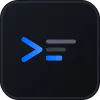
This command is used to open a hyperlink linked to a point. The program continually requests selection of a point, and then if the point does have a hyperlink, it tries to open it with the relevant application. The command Edit Points initiates the same sequence.
The point can have both images and voice notes associated with it.