tcpMDT
List Points - MDT26
List Points
 | Command to execute in the CAD |
|---|---|
Vertical menu | MDT26 > Points > List Points |
Ribbon menu | Points > Operations > List |
Command line |
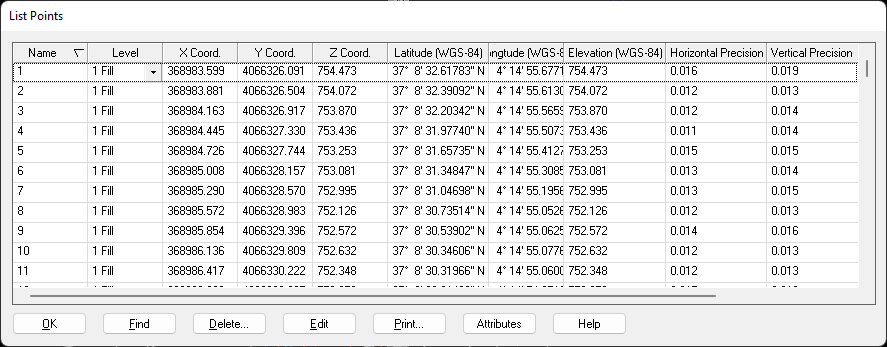
This command displays a list containing the points selected. It has a vertical scroll bar, that enables one to select a point from the list with the cursor, which can be located on screen by clicking on the Locate button.
Initially the list appears ordered according to the name of the points, in ascending order. Clicking on the first cell of this column inverts the order. Right clicking on the line that contains the headings displays a menu used to change the field used for ordering, as well as hide and/or add fields to the list. A line of the list can also be hidden by right clicking on it.
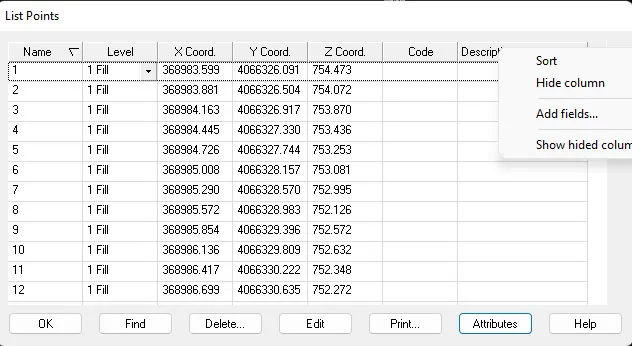
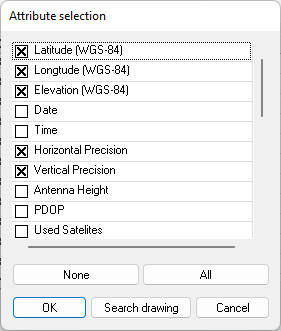
When adding a field, a window is displayed with a list of all the predefined attributes that the program recognizes. Pressing the button Browse Drawing, it runs through it, and in the list displays only the attributes for which a point has a defined value.
It also allows one to edit these points. In order to do so, a point within the list is selected and the Edit button clicked. The Edit Points window is then displayed, which allows one to modify any field it contains.
One can choose to Print in this window. The relevant window is then displayed. The list format in text mode is as follows:
POINT LIST
Name X Coord. Y Coord. Z Coord. Code
1 422367.355 4068639.079 70.840
2 422378.326 4068642.938 71.300
3 422387.818 4068652.044 71.840
4 422386.678 4068654.075 71.860
5 422411.167 4068693.520 73.830
6 422429.688 4068723.361 75.390
7 422451.340 4068758.349 77.150
8 422455.229 4068766.271 77.550
9 422458.130 4068778.227 78.100
10 422463.956 4068811.373 79.590
If the title and reference have been defined in the drawing or the project, they will appear centered on the top of the first page of the list. See the Project command for further details on how to assign such data.
Furthermore, if uncertainties have been assigned to these points, the columns of uncertainties in the X, Y and Z coordinates appear on the list automatically.