
tcpMDT
Alignment and Long Section - MDT26
Alignment and Long Section
 | Command to execute in the CAD |
|---|---|
Vertical menu | MDT26 > Points > Create Points > Alignment and Long Section |
Ribbon menu | Points > Create > Alignment and Long Section |
Command line |
This command creates a point for each of the profile's vertices from a graphically defined horizontal alignment or from either a horizontal alignment or segment file. The X and Y coordinates are calculated by interpolating the position on the horizontal alignment at each vertex's station, while elevation is equivalent to the profile's elevation. Each point's code will be the code of each vertex should they be defined.
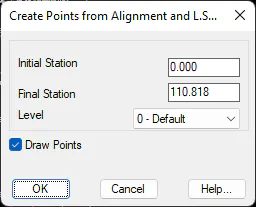
The dialog box allows one to perform this operation with a subset of profiles by entering the Initial Station and the Final Station, choosing the Level to which the points will belong and controlling whether they will be drawn with Draw Points check box.